Audio Editor Gold Xmas Edition 7

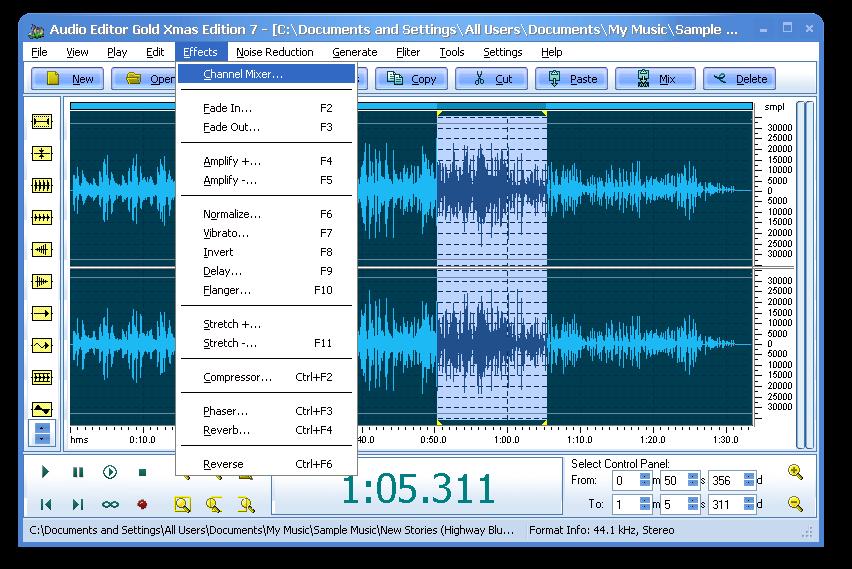
Audio Editor Gold is an advanced and powerful, full-featured digital audio editing software. You can use it to record your own music, voice, or other audio, edit it, mix it with other audio or musical parts, add effects like Reverb, Chorus, and Echo, and master it so that you can burn it to a CD, post it on the World Wide Web, or e-mail it.
It provides an intuitive, easy-to-use interface and enables you to perform a lot of operations without any difficulties! Audio Editor Gold supports all major audio file formats. If you're using audio for anything - Websites, PowerPoint presentations, Flash animations, It will take your creations to the next level!

Use Audio Editor Gold to record your own music, voice or other sounds, import and export lots of audio files formats, including Windows PCM (WAV), MP3, Ogg Vorbis, WMA 9 and AIFF, play it, mix it, edit audio files visually using Cut, Copy, Paste and applying more than 20 effects and filters, including: Cut, Paste, Move, Delete, Fadein/Out, Crossfade, Vibrato, Delay, Normalize, Fade, Flanger, Amplify, Invert, Insert Silence, and more.

Features:

  • - Convert text to speech; 
  • - A smart recorder included in 7.5 Edition so that you don't need to run the whole application when you just want to record; 
  • -Open, create, and save audio files in any of the supported formats (can also save any portion of a loaded file to disk as a new file); 
  • -Display audio data waveform (Zoom Full, Zoom In, Zoom Out, Zoom Vertical); 
  • -Record audio data from a microphone or any other available input device (You can record audio from DVD / VCD / CD Player, Tapes and LP's, MP3 Player, RealPlayer, Windows Media Player, Web Page, Internet Conversation, Internet News, Internet Radio Station and more); 
  • -Edit audio files visually (Cut, Copy, Delete Selection, Delete Silence, Paste, Paste From File, Mix, Mix From File); 
  • -Apply various effects (Amplify, Compressor, Delay, Equalize, Fade In and Fade Out, Flanger, Invert, Normalize, Phaser, Reverb, Reverse, Silence, Shrink, Stretch, Vibrato, etc.); 
  • -Apply different filters to any selected portion of audio files (BandPass Filter, FFT Filter, HighPass Filter, HighShelf Filter,LowPass Filter, LowShelf Filter, Notch Filter); 
  • -Convert an audio file from one format to another; 
  • -Use marker to locate the selected part or special part of the audio data; 
  • -Add and edit extra information to your audio files (Album, Artist, Comments, Copyright, Genre, Title, Year).

AVG Internet Security 2014

Avg Internet security

AVG Internet Security 2013 is a capable security suite which does a generally very good job of protecting your PC from dangers, both on and offline.

At the program's core is AVG's strong antivirus engine. A little more accurate in this release, and with significantly reduced scanning times, this monitors every file you access, detecting and removing malware before it can cause any damage. And, conveniently, Whole Computer scans now look for and remove rootkits, as well: you don't have to run a separate scan to locate them.

The suite also includes a firewall, which protects you from network attacks and monitors running programs to make sure malware can't "phone home". A key improvement here is that this now works almost entirely automatically, so you're unlikely to be hassled with pop-ups and alerts any more.

The spam filter is also significantly enhanced. The last edition blocked only 55% of our test junk emails; AVG Internet Security 2013 has raised the detection rate to an impressive 88%.

And the suite also benefits from a new Windows 8-style interface. While this looks a little plain, we found it simple to use, with the various tiles delivering quick access to the program's various functions and features. An Options menu allows you to carry out just about any Internet Security Suite action in just a couple of clicks, and if you're still a little confused then a good local Help file will quickly point you in the right direction.

The news isn't all quite so good. Previously AVG Internet Security was able to add icons to results from all the main search engines, highlighting dangerous sites so that you'd know not to click their links. Now, these icons only appear when you use AVG's own Secure Search, either via the suite's browser toolbar, or by changing your browser search page. (AVG Internet Security 2013 will set this up by default during installation, but if you'd rather it leave your browser untouched then choose the Custom Installation option and you can turn the relevant options off.)

Fortunately, the suite does include other technologies to help keep you safe online. AVG's LinkScanner module vets web pages before they're displayed in the browser, for instance, and blocked a little more than half of our test malicious URLs. And if something does get downloaded then it'll be vetted by the antivirus engine, which will detect and remove most dangerous files.

And so, on balance, AVG Internet Security 2013 looks like a solid move forward. Not everyone will like the slightly plain interface, and browsing protection still needs work, but otherwise the suite is faster, more accurate and smarter than before, and it does a generally good job of keeping your PC safe from harm.

     Serial No: Use One Of These Given Below

 AVG Internet Security 2014 Keys


  1. 8MEH-R2CML-SS7FW-MOXFR-TRU8V-3­EMBR-ACED
  2. 8MEH-R336M-QDYTV-ECNOR-6VWKU-C­EMBR-ACED
  3. 8MEH-R3VBQ-DC433-3FPOA-YADFU-N­EMBR-ACED
  4. 8MEH-R3VBQ-DC433-3FPOA-YFE9U-N­EMBR-ACED
  5. 8MEH-R6633-YP39H-YCNSR-H7BQT-E­EMBR-ACED
  6. 8MEH-R6633-YP39H-YCNSR-HHW2U-E­EMBR-ACED
  7. 8MEH-RS47Y-82HT8-GONVA-B7378-DEMBR-ACED
  8. 8MEH-REDSL-7ETEC-ULA8R-EAOKL-4EMBR-ACED
  9. 8MEH-RCFXA-ZD2JS-8ROGA-GQGCK-7EMBR-ACED
  10. 8MEH-RF7RF-MR8JO-EWOVA-UO3JQ-FEMBR-ACED
  11. 8MEH-RD8B8-2G6G3-Z6YQA-EC6QJ-GEMBR-ACED
  12. 8MEH-RS47Y-82HT8-GONVA-B7378-DEMBR-ACED

Change Windows XP Service Pack 2 to Service Pack 3 Without Installation

Change Windows XP 

Service Pack 2 to Service Pack 3 without Installation


Hi to all. Here I am going to share a method to change windows xp service pack 2 to service pack 3 within just a minute.
We all must have come across a situation when we would be requiring Windows XP service Pack 3 to run some applications or due to some other reason but we may be running Service pack 2. I have also come across this situation and then I googled it and found a very simple solution to this problem. so Here I am sharing this trick with you all.

Change Windows XP Service Pack 2 to Service Pack 3

change windows xp service pack 2 to service pack 3
  1. First go to run by clicking on the start menu or simply pressing Windows + R button on Keyboard.
  2. Now type regedit in  the run box and hit enter.
  3. Make a backup of your registry (just in case)
  4. Browse to “HKEY_LOCAL_MACHINE\SYSTEM\ CurrentControlSet\ Control\ Windows”
  5. Modify the value of “CSDVersion” from “0×00000200″ (SP2) to theWindows XP SP3 value of “0×00000300″
  6. Now close the Registry editor window and Reboot/Restart yourcomputer.
  7. After restarting your PC Check Your PC properties , It will be showingWindows XP service Pack 3.
Now I will explain you what we did now…

When we changed the value of CSD Version from 200 to 300. It makes the OS think that it is Service Pack 3. And thus if you install any program requiringWindows XP service Pack 3 and up then that program will also think that it isWindows XP 3.  So now you know how to change Windows XP service pack 2 to service pack 3 So use this trick to fool Windows and enjoy....

Recover Your Hacked Facebook Acount

Facebook became the most popular social networking website and now a days we are using the Facebook in office,college,home and in short everywhere and there are many people who are just addicted to the Facebook because of its awesome features and Facebook is going to graph search which is quit interesting feature of Facebook because I am using it right now and now lets talk about the “How to recover your Facebook account ?” There might be many reason that your Facebook account got hacked, Now lets recover it :)
Now lets start the recovering the hacked Facebook  account.

1. Login into your Facebook account

2. Now open this link

3. Now Enter your Email address, phone Number or username and click on search

 4. Now just select the one option among that two option. if you have selected 1st option then you should be logged in into your Email account. (Like mine is gmail account so I should logged in gmail account)
and then one window will popup to conformation your Email account and then it will redirect you to change the password forum. And if you have chosen the 2nd option then it will send the password reset link to your Email address and then you can recover your Facebook account.

    If the attacker have changed the primary Email address of the Facebook account then it will be too hard to recover the Facebook account !!

ICQ 8.1 Build 6323 Final

File--24.blospot.com
"ICQ 8.1 Build 6323 Final"

ICQ is an instant messaging computer program that lets you find your friends and associates online in real time. ICQ features include offline user messaging, multi-user chats, free daily-limited SMS sending, resumable file transfers, greeting cards, multiplayer games and a searchable user directory. Chat with Facebook friends: Add your Facebook friends to your contact list and chat with them while their online in Facebook directly from your ICQ.


Get social: Get updates from social networks and chat with Facebook friends directly from your ICQ. Express yourself: Update your status and share your favorite links and images through the new ICQ status box. Share pictures: Pictures of yourself and others with the new ICQ picture sharing tool. Download ICQ Messenger and chat for free with friends from ICQ, Facebook, Google Talk and more.

ICQ includes:

• Free Messaging with PC and Mobile
• File Sharing Options
• ICQ Search Suite

ICQ Features:

• File Transfer
• Easy Login
• Multi instance support
• User Profile
• Google Talk
• Audio & Video
• Moods
• Messaging History
• Facebook Chat
• Take a Picture
• Add Friends
• Feeds from Friends
• Status Box
• Email & Notifications
• Online Games
• Client Personalization
• Picture Sharing

More Features:

• Voice and Video Chat. Write to your friends, talk to them or just stare at their face, with free text, voice and video chat.
• Multi Chat. The more, the merrier! Chat with multiple friends in one message window.
• Birthday Reminder. Send your friends an ICQ greeting card or wish them a ‘happy birthday’ with free birthday SMS*. (*This feature is available only in supported territories)
• Game Center. Play free online games on ICQ! RPS, Zoopaloola and many more.
• Emoticons Gallery. Get funny and free emoticons to spice up your text messages.

ICQ Top Features

New on ICQ 8

Your new ICQ2go is available on any computer, no download needed. Launch Web-ICQ

Homepage :
www.icq.com


Skype 6.6.0.106 Final


File-24.blogspot.com

"Skype 6.6.0.106 Final"

Skype lets you make Internet-based VoIP (voice over Internet protocol) phone calls for free to anyone in the world who also uses Skype on their PC, and make inexpensive calls from your PC to landlines and cell phones worldwide. Skype uses P2P (peer-to-peer) technology to connect you to other users – not to share files this time, but to talk and chat with your friends. The technology is extremely advanced – but super simple to use…


You’ll be making free phone calls to your friends in no time! It’s also an instant messenger as well, because has integrated chat. Skype is the simplest way to save money on your phone bill. Skype does more than phone calls. It also lets you video chat and text chat as well, and send SMS messages. The newest version of Skype also features nifty integration with Firefox – you can call any phone number you see on a Web site with one click. Skype will automatically recognize your headset, microphone, and speakers, so you don’t need to worry about configuration.

To call another Skype user, enter a user name, and you’re ready to go. You can also save a list of users, so calling them back is simple. To call landlines and cell phones, you’ll need to set up an account and buy credit. Then, whenever you make a call, that credit is used. Calling other people on Skype is free so you can talk whenever you want to – not just on special occasions. Call to check in with mum when you’re travelling, give your partner a goodnight kiss via video call when they’re away on business, or use it for your regular calls and catch ups. And, if you know people who don’t use Skype you can call them too at really low rates.

Popular and preeminent VoIP service Skype has wooed its fair share of people with an itch to ditch the landline and an Internet connection, especially those with international contacts. With its latest update to version 5, the company hopes to win over even more customers and keeping the current ones happy. Skype 5.0 features a streamlined interface, Facebok integration, and videoconferencing functionality. Last but not least, Skype now has Facebook integrated seamlessly into the interface. A tab along the top of the screen will take you into your news feed, where you can update your status as well as start Skype calls with various contacts.

Skype was founded in 2003 by Niklas Zennström and Janus Friis. Skype created a little piece of software that makes communicating with people around the world easy and fun. With Skype you can say hello or share a laugh with anyone, anywhere. And if both of you are on Skype, it’s free.
Skype is available in 28 languages and is used in almost every country around the world. Skype generates revenue through its premium offerings such as making and receiving calls to and from landline and mobile phones, as well as voicemail and call forwarding.

Features:

• Free unlimited worldwide phone calls to anyone else on Skype, anywhere in the world
• Skype video (webcam), see who you are talking to with free video calls
• Chat with up to 100 people in group chats
• Superior sound quality – better than your regular phone
• Your calls are encrypted “end-to-end” for superior privacy
• Friends list shows you when your Skype friends are online and ready to talk or chat
• Works with all firewall, NAT and routers – nothing to configure!
• Super-simple and easy to use
• Based on cutting edge peer-to-peer technology developed by the creators of Kazaa and Joltid In order to use Skype for Windows software.
• SkypeOut– You can call a real phone number from Skype. This is not free like Skype to Skype calls but is cheaper than what the call would normally cost.
• SkypeIn – For people to be able to call your Skype account from a phone, you need a SkypeIn number to give to them. Receiving calls from phones doesn’t cost you anything but will charge the caller the same rate as if they were calling a real phone.
• Video calls – You can make video calls for free using Skype. This enables you to see the person you are talking to and for them to see you too.
• Conference calls – You and 24 other people can engage in a conference call using Skype. This makes having group discussions with staff that are located in various parts of the world much easier.
• File Sharing – You can easily send files over Skype to any of your Skype contacts. There are no size limits for the file, which is a benefit over email restrictions. For security reasons, before the file transfer can begin, the recipient has to approve the transfer, thus the person has to be online for the file transfer to take place.
• Instant messaging – In addition to talking with your Skype contacts, you can type messages to them while you are having a voice conversation or if you cannot talk to them at a particular moment.
• Text messaging – You can use Skype to send text messages to any cell phone in the world. The rates vary but are generally cheaper than what a text message usually costs.
• Voicemail – If you want people to be able to leave you voice messages while you are on another call or offline.

What You Need:

• A computer with an Internet connection.
• A headset with a microphone – You will need to purchase a headset with a microphone (most cost less than $15) that will plug into the microphone plug on your computer. You do not need to purchase a headset if you are only using Skype to send instant messages, text messages, or using other features that do not require you to speak.


-Chanelog: Click


Home page -
http://skype.com/